our next step is to import tkinter create the mainwindow for the app and set the app title
from tkinter import *
app=Tk()
app.title('jimispython.code.blog')
now lets create our function to display our calender for a given date.
def update_calender():
    #get month and year from the entries
    mm=0
    yy=0
    mmm=monthtk.get()
    yyy=yeartk.get()
    if mmm!=0 or mmm=='':
        calender=calendar.month(yyy,mmm)
    else:
        calender=calendar.calendar(yyy)
    cal.set(calender)
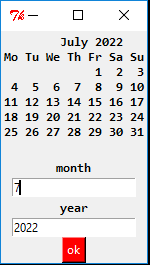
lets create the entries for month and year then the button to call our function and keep our main window to wait for user interaction
cal=StringVar()
cal.set(calender)
yeartk=IntVar()
monthtk=IntVar()
label=Label(textvariable=cal,font= "Consolas 10 bold").pack()
label=Label(text='month',font= "Consolas 10 bold").pack()
entry1=Entry(textvariable=monthtk).pack()
label=Label(text='year',font= "Consolas 10 bold").pack()
entry2=Entry(textvariable=yeartk).pack()
button=Button(text='ok',fg='white',bg='red',command=update_calender).pack()
app.mainloop()
import calendar

yyy = 2022
mmm = 10

# display the default calendar
print(calendar.month(yyy, mmm))
calender=calendar.calendar(yyy)
from tkinter import *
app=Tk()
app.title('jimispython.code.blog')
def update_calender():
    #get month and year from the entries
    mm=0
    yy=0
    mmm=monthtk.get()
    yyy=yeartk.get()
    if mmm!=0 or mmm=='':
        calender=calendar.month(yyy,mmm)
    else:
        calender=calendar.calendar(yyy)
    cal.set(calender)

cal=StringVar()
cal.set(calender)
yeartk=IntVar()
monthtk=IntVar()
label=Label(textvariable=cal,font= "Consolas 10 bold").pack()
label=Label(text='month',font= "Consolas 10 bold").pack()
entry1=Entry(textvariable=monthtk).pack()
label=Label(text='year',font= "Consolas 10 bold").pack()
entry2=Entry(textvariable=yeartk).pack()
button=Button(text='ok',fg='white',bg='red',command=update_calender).pack()
app.mainloop()
full code for python tkinter calendar project
 Jimis Python