All you need is just python and the pygame library
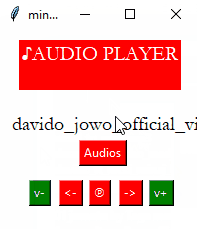
With this audio player you can search, play, pause get next song get previous song on your device
Pygame is a python library for game programming
For now all you need to know about pygame is how it can be used to make audio player
Pygame has the module mixer for loading and playing sounds and controlling audios as we shall see
pip install pygame
Now let’s load an audio an play it
from pygame import mixer
# Starting the mixer
mixer.init()
# Loading the song
mixer.music.load("audio.mp3")
# Start playing the song
mixer.music.play()
Now we can load and play audio ,let’s set the volume using this code
from pygame import mixer
# Starting the mixer
mixer.init()
# Loading the song
mixer.music.load("song.mp3")
# Start playing the song
mixer.music.play()

# Setting the volume
mixer.music.set_volume(0.7)
And we can pause and un pause audio using this codes
# Pausing the music
mixer.music.pause()
# Resuming the music
mixer.music.unpause()
Stop and exit the mixture using this code
# Stop the mixer
mixer.music.stop()
let’s build a GUI for this using tkinter
first import mixer from pygame
import os for getting audios from your machine
import tkinter for gui
messagebox to display pop up messages and filedialogue to open files
from pygame import mixer
import os
from tkinter import*
from tkinter import messagebox, filedialog
then initialize the mixture
and give the default directory from which audio files will be loaded
mixer.init()
dir_path=os.path.dirname(os.path.realpath('C:\\User\\g'))
Declare our variables
allaudios to store all loaded audios
audionumber to to keep track of total number of audios loaded
now to know the position (number) of current audio playing
volume to set volume for audio
pause to determine whether audio is paused or not
allaud_name to keep all the names of loaded audios
allaudios=[]
audionumber=0
now=0
volume=0.4
mixer.music.set_volume(volume)
allaud_name=[]
pause=False
Create our main window
Give the window a title
Give the window a color
Give the window default size
app=Tk()
app.title('mini player')
app.config(bg='white')
app.geometry('200x200')
Function to load our audios
This function Check files in the given directory
If any file ends with .mp3 then increase the audionumber by one
Append the file to audio_name
To make the full path to access the audio then use the os.join to join the root of the audio to the file name
In the full path created replace double slash with four slashs so that we get a valid path
Then print all loaded audio files
def loadaudios():
    global allaud_name
    global audionumber
    global allaudios
    global dir_path
    for root,dirs,files in os.walk(dir_path):
        for file in files:
            if file.endswith('.mp3'):
                audionumber=audionumber+1
                #print(root+'/'+str(file))
                allaud_name.append(file)
                audio=os.path.join(root,file)
                audio2=audio.replace('\\',"\\\\")
                allaudios.append(audio2)
    print(allaudios)
Now this is the function for pausing and playing the audio
If this function is called check pause==FALSE that is song is playing
If true the song is playing then pause it and set pause to be TRUE
Else if song is paused then unpause it and set pause to FALSE
def pause_play():
    global now
    global pause
    global allaud_name
    if pause==False:
        mixer.music.pause()
        pause=True
    else:
        mixer.music.unpause()
        pause=False
    pass
This function increase the volume by 0.2 each time it’s called
def volp():
    global volume
    volume=volume+0.2
    mixer.music.set_volume(volume)
This function decreases the volume by 0.2 each time it’s called
def volm():
    global volume
    volume=volume-0.2
    mixer.music.set_volume(volume)
This function is to play next song it stops the current audio and loads the next audio by increasing now by one and then plays the audio
def next_audio():
    global audionumber
    global now
    now=now+1
    mixer.music.stop()
    mixer.music.load(allaudios[now])
    mixer.music.play()
    audnow.set(allaud_name[now])
This function is to play previous song it stops the current audio and loads the previous audio by decreasing now by one
And then plays the audio
def pre_audio():
    global now
    global allaud_name
    now=now-1
    mixer.music.stop()
    mixer.music.load(allaudios[now])
    mixer.music.play()
    audnow.set(allaud_name[now])
This function displays all the audio files loaded,selects folder ,searches audio files and plays them
So here new window is created for this function and set its colour to white
Declare tkinter variable to handle search of audio
Create and entry for searching
Create a button that will call what I call a secondary function in this function to search audio for the text in the entry
Add scrollbar to the new window that will scroll in the y axis
Add another scrollbar that will scroll in the x axis
Then add the list box which will contain the all the audios and search results and attach the two scrollbars to work with it
then add all audios in the listbox
Set the direction in which two scrollbars will scroll listbox contents
Add a button to play selected audio in the listbox which will call the secondary function select which will play the selected song
Add button to open folder to display audio of a particular folder this function calls the selectfolder function

def allaudio():
    global allaud_name
    global audionumber
    global allaudios
    global now
    def searching():
        global allaud_name
        global audionumber
        global allaudios
        global now
        search_text=search.get()
        print(search_text)
        listbox.delete(0,'end')

        print(search_text)
        for i in allaud_name:
            if search_text in i:
                listbox.insert(END, str(i))
                listbox.pack(side=LEFT, fill=BOTH)
    def select():
        global allaud_name
        global audionumber
        global allaudios
        global now
        for i in listbox.curselection():
            print(listbox.get(i))
            selected=listbox.get(i)

        audnow.set(selected)
        for i in range (0,len(allaud_name)):
            if allaud_name[i]==selected:
                now=i
                mixer.music.stop()
                mixer.music.load(allaudios[now])
                mixer.music.play()
                audnow.set(allaud_name[now])

        newwindow.destroy()
    def selectfolder():
        global allaud_name
        global audionumber
        global allaudios
        global now
        global dir_path
        now=0
        audionumber=0

        directory= filedialog.askdirectory(initialdir="%")
        dir_path=directory
        allaud_name=[]
        allaudios=[]
        loadaudios()
        newwindow.destroy()
    newwindow=Toplevel()
    newwindow.config(bg='white')
    search=StringVar()
    ent1=Entry(newwindow,textvariable=search).pack()
    but2=Button(newwindow,text='SEARCH',bg='red',fg='white',command=searching).pack()

    scrollbar = Scrollbar(newwindow)
    scrollbar.pack(side=RIGHT, fill=Y)
    scrollbar2 = Scrollbar(newwindow)
    scrollbar2.pack(side=BOTTOM, fill=Y)
    listbox = Listbox(newwindow, yscrollcommand=scrollbar.set,bg='white',fg='black',xscrollcommand=scrollbar2.set)
    for i in allaud_name:
        listbox.insert(END, str(i))
        listbox.pack(side=LEFT, fill=BOTH)
    scrollbar.config(command=listbox.yview)
    scrollbar2.config(command=listbox.xview)
    but=Button(newwindow,text='PLAY',bg='red',fg='white',command=select).pack()
    but3=Button(newwindow,text='FOLDER',bg='red',fg='white',command=selectfolder).pack(side=RIGHT)
    pass
Now lets get to the secondary functions in this allaudio()
This function is to search for the audio in the loaded audios
This function gets the text from the entry box and searches for related audio name in the allaud_name
It deletes the content of the listbox then it inserts the new related results into the list box
    def searching():
        global allaud_name
        global audionumber
        global allaudios
        global now
        search_text=search.get()
        print(search_text)
        listbox.delete(0,'end')

        print(search_text)
        for i in allaud_name:
            if search_text in i:
                listbox.insert(END, str(i))
                listbox.pack(side=LEFT, fill=BOTH)
Function for selecting audio
This function first gets the selected item from the list box and then sets the selected audio name as the current playing audio
Then it searches for a match between the selected file and allaud_name and it sets now number to the number of the matching allaud_name and the plays the audio.
    def select():
        global allaud_name
        global audionumber
        global allaudios
        global now
        for i in listbox.curselection():
            print(listbox.get(i))
            selected=listbox.get(i)

        audnow.set(selected)
        for i in range (0,len(allaud_name)):
            if allaud_name[i]==selected:
                now=i
                mixer.music.stop()
                mixer.music.load(allaudios[now])
                mixer.music.play()
                audnow.set(allaud_name[now])
        newwindow.destroy()
The function for selecting folder
Uses filedialog for user to change the current directory
After changing the directory, it clears the audios of the old directory
    def selectfolder():
        global allaud_name
        global audionumber
        global allaudios
        global now
        global dir_path
        now=0
        audionumber=0

        directory= filedialog.askdirectory(initialdir="%")
        dir_path=directory
        allaud_name=[]
        allaudios=[]
        loadaudios()
        newwindow.destroy()
call loadaudios() to load all audios current folder
Now back to the main window let’s add command buttons
First declare tkinter variable to display the current playing song
And set it to ‘’,no song is playing
Add a label for the app, its like the logo
Add a label for currently playing audio
Add buttons for next, previous, pause and play v+ and v-
Then call app.mainloop() to keep the app running
loadaudios()
audnow=StringVar()
audnow.set(' ')
appname=Label(text='♪AUDIO PLAYER\n',bg='red',fg='white',font=('garamond',15)).place(x=20,y=10)
audname=Label(textvariable=audnow,bg='white',font=('garamond',15)).place(x=10,y=80)
nxt=Button(text='Audios',bg='red',fg='white',command=allaudio).place(x=80,y=110)
nxt=Button(text='->',bg='red',fg='white',command=next_audio).place(x=120,y=150)
pev=Button(text='℗',bg='red',fg='white',command=pause_play).place(x=90,y=150)
pev=Button(text='<-',bg='red',fg='white',command=pre_audio).place(x=60,y=150)
vm=Button(text='v-',bg='green',fg='white',command=volm).place(x=30,y=150)
vp=Button(text='v+',bg='green',fg='white',command=volp).place(x=150,y=150)
app.mainloop()
this is the full code for the python tkinter pygame audio player
from pygame import mixer
import os
from tkinter import*
from tkinter import messagebox, filedialog
mixer.init()
dir_path=os.path.dirname(os.path.realpath('C:\\User\\g'))
allaudios=[]
audionumber=0
now=0
volume=0.4
mixer.music.set_volume(volume)
allaud_name=[]
pause=False
app=Tk()
app.title('mini player')
app.config(bg='white')
app.geometry('200x200')
def next_audio():
    global audionumber
    global now
    now=now+1
    mixer.music.stop()
    mixer.music.load(allaudios[now])
    mixer.music.play()
    audnow.set(allaud_name[now])
    pass
def pre_audio():
    global now
    global allaud_name
    now=now-1
    mixer.music.stop()
    mixer.music.load(allaudios[now])
    mixer.music.play()
    audnow.set(allaud_name[now])

def pause_play():
    global now
    global pause
    global allaud_name
    if pause==False:
        mixer.music.pause()
        pause=True
    else:
        mixer.music.unpause()
        pause=False
    pass
def volp():
    global volume
    volume=volume+0.2
    mixer.music.set_volume(volume)
def volm():
    global volume
    volume=volume-0.2
    mixer.music.set_volume(volume)
def loadaudios():
    global allaud_name
    global audionumber
    global allaudios
    global dir_path
    for root,dirs,files in os.walk(dir_path):
        for file in files:
            if file.endswith('.mp3'):
                audionumber=audionumber+1
                #print(root+'/'+str(file))
                allaud_name.append(file)
                audio=os.path.join(root,file)
                audio2=audio.replace('\\',"\\\\")
                allaudios.append(audio2)
    print(allaudios)

def allaudio():
    global allaud_name
    global audionumber
    global allaudios
    global now
    def searching():
        global allaud_name
        global audionumber
        global allaudios
        global now
        search_text=search.get()
        print(search_text)
        listbox.delete(0,'end')

        print(search_text)
        for i in allaud_name:
            if search_text in i:
                listbox.insert(END, str(i))
                listbox.pack(side=LEFT, fill=BOTH)
    def select():
        global allaud_name
        global audionumber
        global allaudios
        global now
        for i in listbox.curselection():
            print(listbox.get(i))
            selected=listbox.get(i)

        audnow.set(selected)
        for i in range (0,len(allaud_name)):
            if allaud_name[i]==selected:
                now=i
                mixer.music.stop()
                mixer.music.load(allaudios[now])
                mixer.music.play()
                audnow.set(allaud_name[now])

        newwindow.destroy()
    def selectfolder():
        global allaud_name
        global audionumber
        global allaudios
        global now
        global dir_path
        now=0
        audionumber=0

        directory= filedialog.askdirectory(initialdir="%")
        dir_path=directory
        allaud_name=[]
        allaudios=[]
        loadaudios()
        newwindow.destroy()
    newwindow=Toplevel()
    newwindow.config(bg='white')
    search=StringVar()
    ent1=Entry(newwindow,textvariable=search).pack()
    but2=Button(newwindow,text='SEARCH',bg='red',fg='white',command=searching).pack()

    scrollbar = Scrollbar(newwindow)
    scrollbar.pack(side=RIGHT, fill=Y)
    scrollbar2 = Scrollbar(newwindow)
    scrollbar2.pack(side=BOTTOM, fill=Y)
    listbox = Listbox(newwindow, yscrollcommand=scrollbar.set,bg='white',fg='black',xscrollcommand=scrollbar2.set)
    for i in allaud_name:
        listbox.insert(END, str(i))
        listbox.pack(side=LEFT, fill=BOTH)
    scrollbar.config(command=listbox.yview)
    scrollbar2.config(command=listbox.xview)
    but=Button(newwindow,text='PLAY',bg='red',fg='white',command=select).pack()
    but3=Button(newwindow,text='FOLDER',bg='red',fg='white',command=selectfolder).pack(side=RIGHT)
    pass
loadaudios()
audnow=StringVar()
audnow.set(' ')
appname=Label(text='♪AUDIO PLAYER\n',bg='red',fg='white',font=('garamond',15)).place(x=20,y=10)
audname=Label(textvariable=audnow,bg='white',font=('garamond',15)).place(x=10,y=80)
nxt=Button(text='Audios',bg='red',fg='white',command=allaudio).place(x=80,y=110)
nxt=Button(text='->',bg='red',fg='white',command=next_audio).place(x=120,y=150)
pev=Button(text='℗',bg='red',fg='white',command=pause_play).place(x=90,y=150)
pev=Button(text='<-',bg='red',fg='white',command=pre_audio).place(x=60,y=150)
vm=Button(text='v-',bg='green',fg='white',command=volm).place(x=30,y=150)
vp=Button(text='v+',bg='green',fg='white',command=volp).place(x=150,y=150)
app.mainloop()


 Jimis Python