
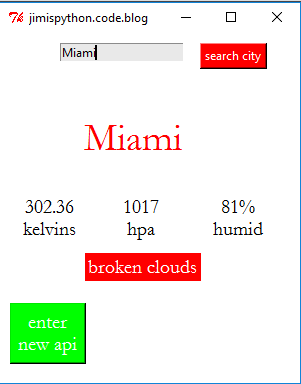
This app can give the user the current weather of any place, with details such as temperature etc
You do not need any external library, only sign up for an api key in this website https://openweathermap.org/
First import the required libraries
Tkinter for GUI
Requests to get weather info from the open weathermap
Json to convert the json data obtained by requests into python data type
import requests, json
#tkinter the gui library
from tkinter import *
from tkinter import messagebox
Create the main window as weatherapp
Give it size
and set the background colour of the mainwindow
create the title of your app
declare and initialize the variable to carry a default api
#main window of our app
weatherapp=Tk()
#app window size
weatherapp.geometry('300x350')
#background color
weatherapp.config(bg='white')
#app title
weatherapp.title('jimispython.code.blog')
#variable storing api key
#enter your api or default api key here
api_key=".........your api..............."
declare a tkinter variable to store cityname
and set default city to be Nairobi
declare tkinter variable for entry, temperature, humidity, pressure, weather description
#tk variable to store cityname
cityname=StringVar()
cityname.set('Nairobi')
#tk variable for entry search
citysearch=StringVar()
#tk variable for temperature label
temp=StringVar()
#tk variable for pressure label
pressa=StringVar()
#tk variable for humidity label
humi=StringVar()
#tk variable for description label
descript=StringVar()
#set nairobi as our default city
citysearch.set('Nairobi')
create entry box to enter city name
create button to call a function that searches the weather for the cityname in the entry box
label to display name of current city
label to temperature, humidity, pressure, general weather
create a button to call a function to signs up a new api
call the function to search city weather so that we get the weather of the default city
the mainloop keeps the application running
#entry for city name
ent1=Entry(bg='#e8e8e8',textvariable=citysearch).place(x=60,y=10)
#button calls the city weather function to search weather info
search=Button(text='search city',bg='red',fg='white',command=city_weather).place(x=200,y=10)
#label displays city name
city=Label(textvariable=cityname,bg='white',fg='red',font=('garamond',30),width=10).place(x=20,y=80)
#label for temperature
temperatur=Label(textvariable=temp,bg='white',fg='black',font=('garamond',15)).place(x=20,y=160)
#label for pressure
press=Label(textvariable=pressa,bg='white',fg='black',font=('garamond',15)).place(x=120,y=160)
#label for humidity
hum=Label(textvariable=humi,bg='white',fg='black',font=('garamond',15)).place(x=210,y=160)
#label for description
descrip=Label(textvariable=descript,bg='red',fg='white',font=('garamond',15),width=10).place(x=85,y=220)
#this button calls a function for entering a new api key
apibut=Button(text='enter\nnew api',bg='green',fg='white',font=('garamond',15),command=new_api).place(x=10,y=270)
#call this function so that we get the weather for the default city
city_weather()
#mainloop to keep the app runing
weatherapp.mainloop()
now let’s deal with the functions
function to search city weather
use the global variable for api key
declare a variable to store url of the website that gives us the weather info
get the cityname from the citysearch tkinter variable
make a complete url for the request to open
get information from the complete url using the request.get() method
now convert the information into python data type using json
create an exception block and check if city is found from the information from the requests
get the respective values for temperature, humidity, pressure and general weather from the information for the requests
set the respective information obtained in their various tkinter variables to display them
show else if city is not found display information that city is not found
in case of other exceptions display the message wrong api key or no internet connection
def city_weather():
    global api_key
    #try:

    # variable to store url
    base_url = "http://api.openweathermap.org/data/2.5/weather?"

    # get city name
    city_name=citysearch.get()


    # variable complete url address
    complete_url = base_url + "appid=" + api_key + "&q=" + city_name

    # get the url response using the get method of requests
    response = requests.get(complete_url)

    # response is a in json format so conver to python data format
    x = response.json()
    # Now x contains list of nested dictionaries
    # Check the value of "cod" key is equal to
    # "404", means city is found otherwise,
    # city is not found
    try:
        if x["cod"] != "404":

            # store the value of "main" in x in the y variable
            y = x["main"]
            #get temperature value from y
            current_temperature = y["temp"]

            #get pressure value from y
            current_pressure = y["pressure"]

            # get humidity value from y
            current_humidity = y["humidity"]
            #store the general weather info in variable z
            z = x["weather"]
            #from z now obtain the weather description
            weather_description = z[0]["description"]

            #add units to temperature
            temperature=str(current_temperature)+'\nkelvins'
            #set the temp tkinter variable to display the temperature
            temp.set(temperature)
            #add units to pressure
            pres=str(current_pressure)+'\nhpa'
            #set the pres tkinter variable value as for pressure
            pressa.set(pres)
            #add units to humidity
            humid=str(current_humidity)+'%\nhumid'
            #set the humi tk variable to display humidity
            humi.set(humid)
            #conver the weather description to string
            description=str(weather_description)
            #set descript to display weather description
            descript.set(description)
            #now display the city name
            cityname.set(city_name)
        else:
            #if invalid city name give this message
            messagebox.showinfo('city','city not found')
            print(" City Not Found ")
    except:
        #incase of wrong api or internet connection display this
        messagebox.showinfo('info','wrong api key\nor internet connection')
function to set a new api
create another nested function here once called sets the new api as the api key
create new with for this using Toplevel()
configure it
create the entry for new api , label and button to call a function to set new api
#function to enter new api
def new_api():
    def set_api():
        global api_key
        api_key=entry.get()
        print(api_key)
        #close the window afterall
        apiwindow.destroy()
    #new window for api
    apiwindow=Toplevel()
    apiwindow.config(bg='white')
    apiwindow.geometry('150x100')
    entry=StringVar()
    label=Label(apiwindow,text='sign up with your api',bg='red',fg='white').pack()
    entry1=Entry(apiwindow,textvariable=entry).pack()
    but1=Button(apiwindow,bg='red',fg='white',text='ok',command=set_api).pack()
python tkinter weather app project full code
#jimispython.code.blog
# Python program to find current
# weather details of any city
# using openweathermap api
#sign for api key in openweathermap website

# import requests ,json to get weather info from
#openweathermap website and json to process the info
import requests, json
#tkinter the gui library
from tkinter import *
from tkinter import messagebox

#main window of our app
weatherapp=Tk()
#app window size
weatherapp.geometry('300x350')
#background color
weatherapp.config(bg='white')
#app title
weatherapp.title('jimispython.code.blog')
#variable storing api key
#enter your api or default api key here
api_key="........................"
#function to enter new api
def new_api():
    def set_api():
        global api_key
        api_key=entry.get()
        print(api_key)
        #close the window afterall
        apiwindow.destroy()
    #new window for api
    apiwindow=Toplevel()
    apiwindow.config(bg='white')
    apiwindow.geometry('150x100')
    entry=StringVar()
    label=Label(apiwindow,text='sign up with your api',bg='red',fg='white').pack()
    entry1=Entry(apiwindow,textvariable=entry).pack()
    but1=Button(apiwindow,bg='red',fg='white',text='ok',command=set_api).pack()
def city_weather():
    global api_key
    #try:

    # variable to store url
    base_url = "http://api.openweathermap.org/data/2.5/weather?"

    # get city name
    city_name=citysearch.get()


    # variable complete url address
    complete_url = base_url + "appid=" + api_key + "&q=" + city_name

    # get the url response using the get method of requests
    response = requests.get(complete_url)

    # response is a in json format so conver to python data format
    x = response.json()
    # Now x contains list of nested dictionaries
    # Check the value of "cod" key is equal to
    # "404", means city is found otherwise,
    # city is not found
    try:
        if x["cod"] != "404":

            # store the value of "main" in x in the y variable
            y = x["main"]
            #get temperature value from y
            current_temperature = y["temp"]

            #get pressure value from y
            current_pressure = y["pressure"]

            # get humidity value from y
            current_humidity = y["humidity"]
            #store the general weather info in variable z
            z = x["weather"]
            #from z now obtain the weather description
            weather_description = z[0]["description"]

            #add units to temperature
            temperature=str(current_temperature)+'\nkelvins'
            #set the temp tkinter variable to display the temperature
            temp.set(temperature)
            #add units to pressure
            pres=str(current_pressure)+'\nhpa'
            #set the pres tkinter variable value as for pressure
            pressa.set(pres)
            #add units to humidity
            humid=str(current_humidity)+'%\nhumid'
            #set the humi tk variable to display humidity
            humi.set(humid)
            #conver the weather description to string
            description=str(weather_description)
            #set descript to display weather description
            descript.set(description)
            #now display the city name
            cityname.set(city_name)
        else:
            #if invalid city name give this message
            messagebox.showinfo('city','city not found')
            print(" City Not Found ")
    except:
        #incase of wrong api or internet connection display this
        messagebox.showinfo('info','wrong api key\nor internet connection')

#tk variable to store cityname
cityname=StringVar()
cityname.set('Nairobi')
#tk variable for entry search
citysearch=StringVar()
#tk variable for temperature label
temp=StringVar()
#tk variable for pressure label
pressa=StringVar()
#tk variable for humidity label
humi=StringVar()
#tk variable for description label
descript=StringVar()
#set nairobi as our default city
citysearch.set('Nairobi')
#entry for city name
ent1=Entry(bg='#e8e8e8',textvariable=citysearch).place(x=60,y=10)
#button calls the city weather function to search weather info
search=Button(text='search city',bg='red',fg='white',command=city_weather).place(x=200,y=10)
#label displays city name
city=Label(textvariable=cityname,bg='white',fg='red',font=('garamond',30),width=10).place(x=20,y=80)
#label for temperature
temperatur=Label(textvariable=temp,bg='white',fg='black',font=('garamond',15)).place(x=20,y=160)
#label for pressure
press=Label(textvariable=pressa,bg='white',fg='black',font=('garamond',15)).place(x=120,y=160)
#label for humidity
hum=Label(textvariable=humi,bg='white',fg='black',font=('garamond',15)).place(x=210,y=160)
#label for description
descrip=Label(textvariable=descript,bg='red',fg='white',font=('garamond',15),width=10).place(x=85,y=220)
#this button calls a function for entering a new api key
apibut=Button(text='enter\nnew api',bg='green',fg='white',font=('garamond',15),command=new_api).place(x=10,y=270)
#call this function so that we get the weather for the default city
city_weather()
#mainloop to keep the app runing
weatherapp.mainloop()
tell us what you think about this python tkinter weather app project

 Jimis Python